NEWOne-click Listing optimization · Hero Product mode · Dashboards in one sentence→

Run your Amazon businesson AI autopilot

Hand it a store and it will learn, diagnose, spot opportunities and act on its own — across Listings, ads and business dashboards, with every step visible and under your control. You set the boundaries: full autopilot, approval for key actions, or free rein within your rules.

Running Can I raise ad spend on B08X7QKZ3M right now?
It runs on its own — and you can jump in anytime ↓
One-click Listing optimizationManaged ad campaignsChat-built dashboardsDesign a new productCreate an AI teammateExplore ABA opportunities
Learns Remembers your ASINs, keywords, structures and approval habits — the more you use it, the better it knows your playbook.
Finds Scans for waste and opportunity 24/7, and lines up what to harvest, clean up or scale.
You decide Budget, bid and negative-keyword changes come as approval packages you can confirm or roll back in one click.
Connected platforms and tools
Amazon SP-API
Amazon Ads API
Brand Analytics (ABA)
Lingxing ERP
SellerSprite
Lark (Feishu)
DingTalk
Shopify
Google Ads
TikTok Ads
What's new · November 2026

Three big updates
that take your operations further

Fix your Listing right on the product page, push hero products stage by stage, and build dashboards with one sentence — the agent drafts the plan, you decide what to adopt.

NEW One-click Listing optimization · Browser extension

Install the extension and fix your Listing right on the Amazon product page

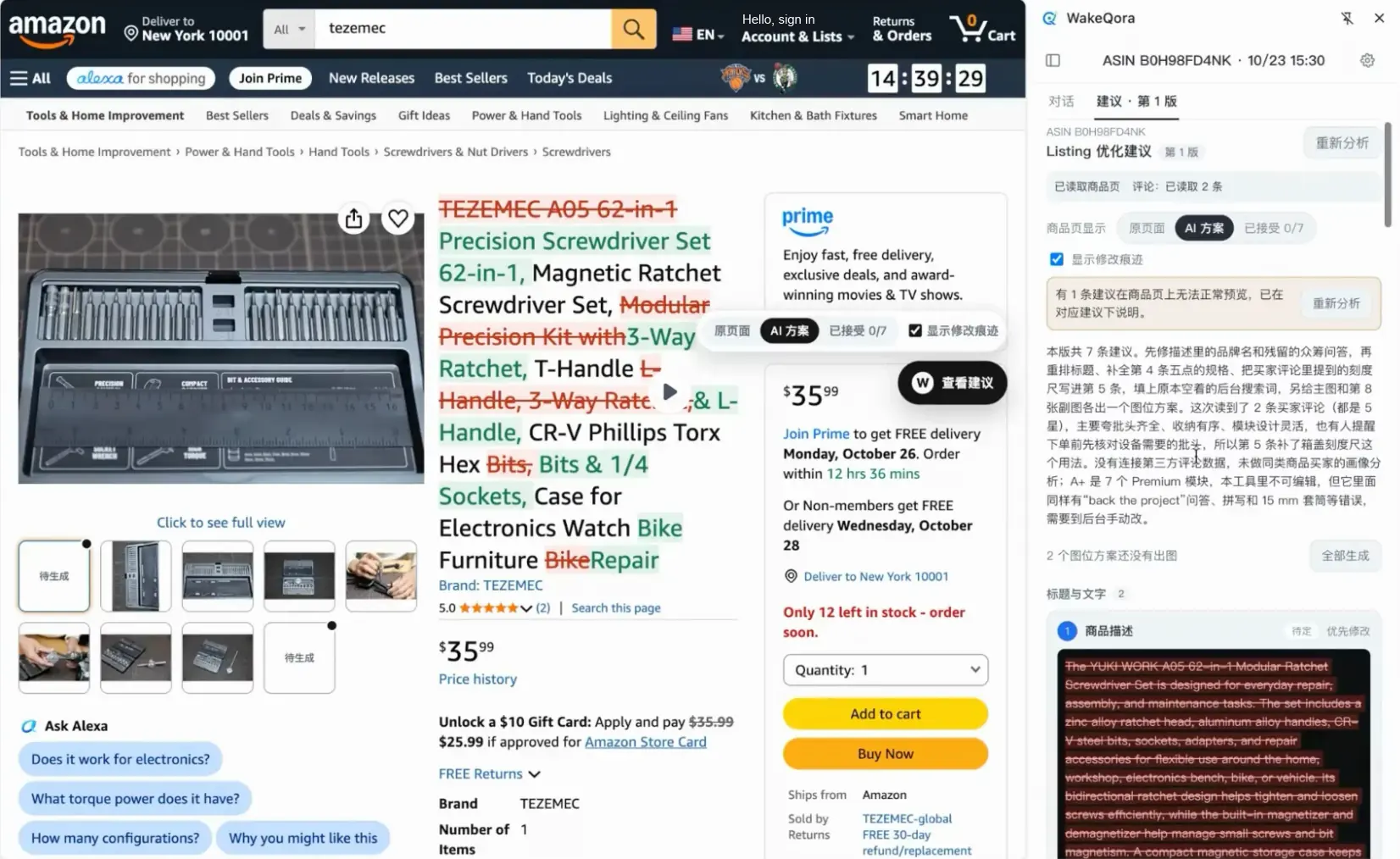
The WakeQora browser extension analyzes the product page and buyer reviews from a side panel and suggests changes one by one. Changes preview live on the product page, and once you confirm, they publish to your Amazon store in one click.
Get the browser extension Works with Chrome, Edge and other Chromium 116+ browsers
  1. AnalyzeOpen any product page to audit the title, bullets, description, images and A+
  2. Live previewChanges appear right on the page, deletions in red, additions in green; switch back anytime
  3. Pick what to adoptEvery suggestion comes with its reasoning — accept, reject or edit
  4. Publish in one clickPublish to your Amazon store or export a change pack, then re-check on a schedule
The WakeQora browser extension previewing Listing suggestions live on an Amazon product page
1Side panel: reads the page and reviews, lists fixes with evidence 2Live preview: title edits shown on the page, red out, green in 3Toggle original / AI version, accept item by item 4Image plan: AI creates missing main and secondary images ✓7 / 7 suggestions acceptedPublish to Amazon
  1. 1Extension analysisAudits from the side panel and explains the reasoning behind every suggestion
  2. 2Live on-page previewChanges appear on the original page, so every edit is easy to see
  3. 3Compare and adoptSwitch between the original and the AI version, accept item by item or edit
  4. 4Publish in one clickImages, copy and A+ updated together and published to Amazon once you confirm
NEW Managed ads · Hero Product mode

Build hero products in stages — the agent sets goals and sticks to limits

Pick a hero ASIN. The agent first checks whether the Listing can convert ad traffic, then sets goals and efficiency limits for each stage, reviews the stage every day, and optimizes and executes automatically.

  • Readiness check first: no live ads means a new build; existing ads are audited, then taken over
  • Launch & ramp → Scale for rank → Hold volume, grow profit → Clear inventory — each stage with its own goal and CPC / ACoS cap
  • Daily stage review: hold, advance, step back, retune, change direction or pause — with reasons and evidence
  • Execution rules are checked every round: no waiting without evidence, no saving budget at the expense of the goal
Today's stage review · done
Hero product · B09KTM4R7N · US marketplace
Yoga mat hero · Hero Product modeApprovals: low-risk auto · key actions need approval
Running
Stage 1 · DoneLaunch & ramp
Goal
Impressions and first orders
Limit
CPC cap $1.20
Stage 2 · ActiveScale for rank
Goal
Organic rank on core keywords
Limit
ACoS cap 40%
Stage 3Hold volume, grow profit
Goal
Keep volume, raise margin
Limit
ACoS cap 25%
Stage 4Clear inventory
Goal
Speed up sell-through
Limit
Stay above break-even
Today: stay in “Scale for rank”Next check tomorrow 09:00
  • Organic rank, core keyword#48 → #21
  • ACoS (7 days)34% · under cap
  • Days of inventory46 days
HoldNext stageStep backRetuneChange directionPause
NEW Dashboards from one sentence

Say one sentence, get a dashboard that alerts you

Describe the metrics you care about and the risks you worry about. The agent designs, previews and publishes the dashboard, refreshes it on schedule and alerts you when something is off. Not sure where to start? Pick from a huge template library.

  • Lots of dashboard templates and design styles — business overview, ads command, inventory control tower — ready in one click
  • Describe alert rules in a sentence and get notified when something goes wrong
  • Hourly or daily refresh, scheduled digests, shared with the whole team
  • Turn existing reporting and monitoring tasks into dashboards in one click
Real recording · one sentence → design draft → dashboard
WakeQora · Dashboards · Dashboard designer
Dashboard templates

A huge template library — pick one and go

Templates fill in automatically once your store data is authorized, and show sample data until then. You can also borrow just the style and turn it into your own dashboard with one sentence. New templates added all the time.

Dashboard templatesDesign stylesAlways growing
Store overview dashboard template
Store OverviewTemplate · Business overview
Ads command center dashboard template
Ads Command CenterTemplate · Advertising
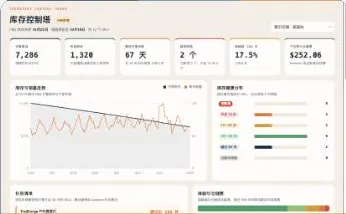
Inventory control tower dashboard template
Inventory Control TowerTemplate · Inventory & replenishment
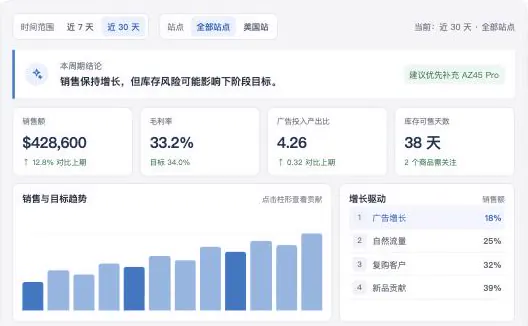
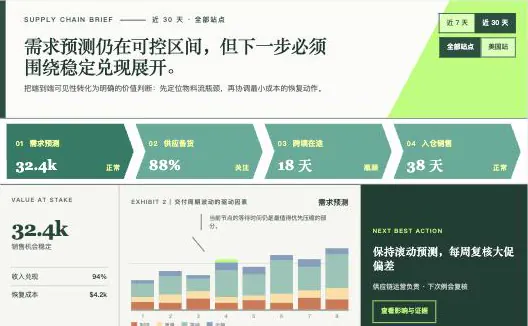
Consulting-style executive brief design style
Executive Business BriefStyle · Conclusions and actions first
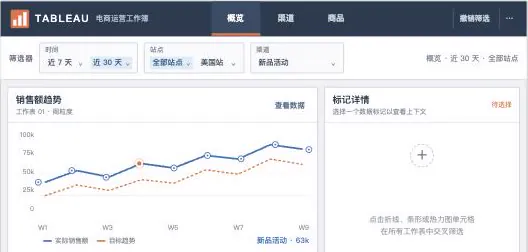
Tableau interactive analysis design style
Tableau Interactive AnalysisStyle · Filters and linked exploration
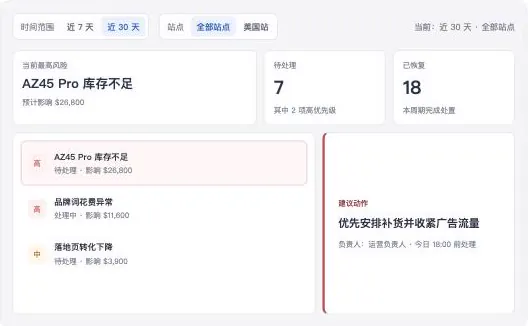
Consulting-style risk response dashboard design style
Risk Response BoardStyle · Explain and handle risks
BCG supply chain control tower design style
BCG Supply Chain Control TowerStyle · End-to-end visibility
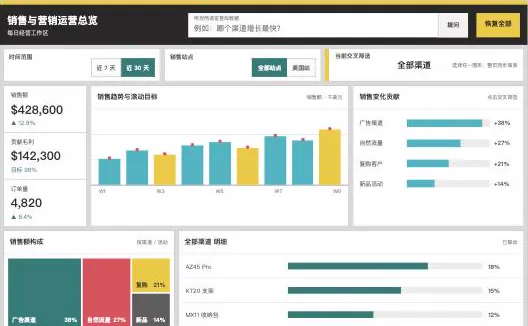
Power BI operations overview design style
Power BI Operations OverviewStyle · Cross-filtering and contribution breakdown
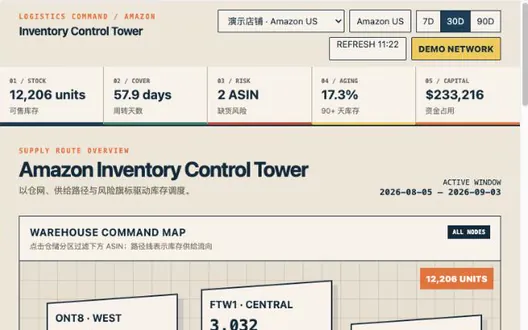
Inventory command dashboard generated from one sentence
Inventory Control TowerBuilt by chat · Demo store
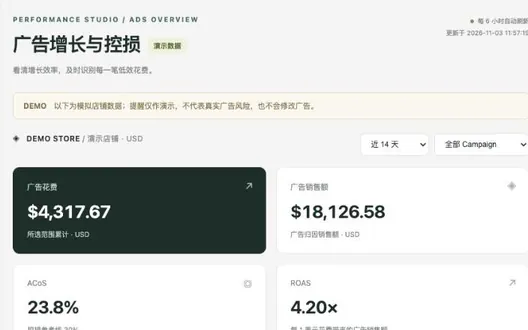
Ad growth and loss-control dashboard generated from one sentence
Ad Growth & Loss ControlBuilt by chat · Demo store
Why WakeQora

Stop trapping your team
in reports and repetitive work

Ad data is scattered across pages, spreadsheets and windows, so problems are always spotted a step too late. The first thing WakeQora does is bring those signals into one hub you can act on.

Before · Manual monitoring

Checking by hand, always a step behind

Reports get rebuilt again and again, and it's hard to see budget, bids, search terms and inventory in one decision.

  • ×You see the data but don't know what to tackle first
  • ×You make a change but can't tell why it worked
  • ×At scale, people can't keep watching everything
After · AI Autopilot

Let AI do the running while you keep the decisions

WakeQora learns your goals and account first, then keeps proposing actions you can execute. When something important changes, it hands you a clear approval package.

  • ✓Finds what's truly worth handling across all your data
  • ✓Explains the reason, impact and risk of every suggestion
  • ✓Every action, intervention, adjustment and review leaves a trail
Product video · about 2 minutes

More than “auto-bidding”
an AI agent that actually operates

See how WakeQora works in one video: it takes in signals, makes judgments, prepares actions and feeds the results into the next round of learning — turning “Can I advertise? → How do I launch? → Learn as it goes → Controlled actions → Daily opportunities” into one visible, controllable loop.

See how WakeQora runs your Amazon ads in 2 minutes
Ads autopilot · Five core capabilities

Five capabilities
one connected decision chain

01 Pre-launch diagnosis

Don't let ad spend pay for a weak Listing

Before any ads go live, it checks whether the page, price, reviews, inventory, Buy Box and competition can convert traffic — so you don't burn budget from day one.

  • Listing completeness and price competitiveness check
  • Review rating and days-of-inventory assessment
  • Buy Box share and competitive landscape
Verdict: fix reviews before scaling
WakeQora pre-launch diagnosis screen
02 Smart launch

Launch new-product ads as a testable structure

Not random campaigns: it builds a traceable, approvable, reviewable SP launch plan around the current stage's goals, budget, break-even point and efficiency limits.

  • Goals by stage, with CPC / ACoS caps and budget guardrails
  • No live ads means a new build; existing ads are audited, taken over and winners kept
  • Observation windows and review checkpoints keep conclusions traceable
Day 7 decision · one-click rollback
WakeQora smart launch plan
03 Account memory

The more it runs, the better it knows your ad setup

It builds long-term knowledge of your ASINs, campaigns, targets and search terms — remembering which terms to harvest, which traffic pools to reuse and which structures to just watch.

  • Long-term tags for harvest terms, watch pools and wasted terms
  • High-converting traffic pools reusable for new ASINs
  • Every decision becomes an account asset
1,284 decisions stored
WakeQora account memory knowledge base
04 Approvals & risk control

Key actions, transparent and controlled

Budget, bid, negative-keyword, pause and restructure actions become approval packages first: why, what changes, what the risk is and how to roll back — all at a glance.

  • Every action shows its reason, impact and risk
  • Approve first, then execute — with one-click rollback
  • Full audit trail for every step
Approval package #1042 · pending
WakeQora approvals and risk control dashboard
05 Continuous optimization

Find opportunities daily, waste less budget

It keeps scanning for low impressions, low conversion, budget utilization, converting terms, wasted terms and growth opportunities — so optimization doesn't depend on someone remembering to look.

  • 24/7 automatic checks with proactive alerts
  • Daily stage review: hold, advance, step back or retune — with reasons
  • Wasted-term detection and converting-term harvesting turned into approval packages
11 opportunities today
WakeQora continuous optimization daily report
Trust that grows · You set the boundaries

Hand over more as trust grows
key decisions stay with you

Start by letting it only diagnose and suggest. As it gets repetitive, verifiable work right again and again, you'll naturally hand over more. How far you go is always up to you.

Hand it over · Autopilot

Reliable, repetitive work runs on its own

Daily work with verifiable results that you already trust runs 24/7 — and stops taking up your time.

  • Continuous checks for waste and opportunity across all your business signals
  • Harvests converting terms and cleans up wasted ones by your rules
  • Automatic daily reports with a traceable record for reviews
Take back control anytime · Keep approvals

Key decisions stay in your hands

Budget, bids and account structure can require approval before execution — how much you delegate is adjustable and reversible anytime.

  • Every action explains its reason, impact and risk
  • Intervene, adjust or roll back in real time
  • Learns your approval preferences so the boundaries fit you better over time
Approval request · #1042Daily budget $120 → $150
Waiting for you
VisibleData, suggestions, progress and results — all with clear context.
ControlledKey actions go through approval, and you can step in anytime.
ReversibleImportant changes are recorded and can be rolled back in one click.
LearningEvery judgment and result becomes the basis for a better next call.
Beyond ads

An AI operations assistant
that gets real work done

Ads are just the start. Product research, teamwork, automated tasks and your data sources all live in one workspace, run by the same agent.

AI Product ManagerBeta

Starting from one keyword, it produces opportunity, product concept and go/no-go cards to judge whether a new product is worth it.

AI Teammate

Add it to a Lark or DingTalk group: teammates @mention it to pull data, analyze and write reports. Give it role-based skills and it works in direct messages too.

Automated tasks

Recurring checks, reminders and monitoring; adjusts budgets by your rules when conditions are met and posts results to your group via bot.

Catalog autopilot

Manage a wide catalog all at once: daily checks on budget use, coverage and cross-project conflicts, with no duplicate actions.

70+ skills and plugins

ABA, SellerSprite, Lingxing ERP, Lark / DingTalk docs, Meta / Google / TikTok Ads, Shopify — and your own playbook can become a personal skill.

Use it anywhere

Switch between web, desktop and browser extension; team workspaces manage members, store authorizations and assets in one place.

Proven results

Proven with large sellers
running the full loop

WakeQora has been validated with two large Amazon sellers, each with ¥500M–1B in annual GMV, covering the two typical models: scaling bestsellers and catalogs of 10,000+ SKUs.

WakeQora business results dashboard after AI autopilot
¥1BPartner annual GMV (CNY)
2Business models validated
100%Key actions approvable and reversible
24/7Automatic checks for waste and opportunity
Customer feedback

What large seller teams say

★★★★★

“What won us over was the approvals. Bid and negative-keyword changes used to depend on someone's gut call, and nobody could explain what went wrong. Now every action comes with an approval package, so we're confident letting it run.”

C
Ms. ChenHome brand · Head of advertising
★★★★★

“Launches aren't guesswork anymore. Goals, budget, break-even and observation window are set up front, we get a clear verdict in 7 days, and team reviews have real evidence.”

D
David L.Electronics seller · Operations director
★★★★★

“Nobody can watch 10,000+ SKUs by hand. Now a daily report lands every morning with wasted terms, harvest terms and opportunities listed — we just make the calls.”

W
Mr. WangWide-catalog seller · Founder
Pricing

WakeQora plans

Choose by team size, order volume and monthly AI usage. Every plan includes the operations assistant, skills and plugins, and automated tasks. Prices in CNY (RMB).

WakeQora Plus

Small sellers, single-brand teams

¥499/ mo¥4,999 / yr
  • 3 members
  • 50,000 orders / yr · 5,000 / mo
  • 1,000 AI credits per month
  • Great for starting with the assistant
Subscribe

WakeQora Max

Large sellers, groups, multiple teams

Custom
  • Custom number of teams and members
  • Custom order and AI usage limits
  • Amazon ads autopilot, customizable
  • Private deployment available
Book a demo · Talk to sales
See the full feature comparison
FeaturesWakeQora PlusWakeQora ProWakeQora Max
Limits
Team workspaces11Custom
Members310Custom
Amazon stores / marketplacesUnlimitedUnlimitedUnlimited
Order limit (annual)50,000 / yr300,000 / yrCustom
Order limit (monthly)5,000 / mo30,000 / moCustom
Monthly AI credits (used by chats, analyses and automated tasks)1,000 / mo6,000 / moCustom
Features
AI operations assistantIncludedIncludedIncluded
Amazon ads autopilot (rolling out)Not includedRolling outIncluded, customizable
Skills and plugins (incl. Listing browser extension)SupportedSupportedSupported, customizable
Automated tasksSupportedSupportedSupported, customizable
Product and ads knowledge baseIncludedIncludedIncluded, customizable
Store authorization and asset managementIncludedIncludedIncluded, customizable
Approvals and activity logBasic activity logAd action approvals + activity logEnterprise approval flows + audit log

How order limits work

Annual plans count orders across the subscription year; monthly plans count per billing month. Limits reset each period and don't carry over. If you go over, we'll suggest an upgrade first — core features are never cut off in the middle of your peak season.

FAQ

Questions sellers ask, answered

Do I have to hand over my Amazon account completely?

No. Key WakeQora actions (budget, bids, negative keywords, pausing, restructuring) are submitted as approval packages by default, run only after you confirm, and can be rolled back in one click. You can start with diagnosis and suggestions only, then gradually allow automatic execution.

How does Hero Product mode work in stages?

After you pick a hero ASIN, the agent checks whether the Listing can convert ad traffic, then moves through “Launch & ramp → Scale for rank → Hold volume, grow profit → Clear inventory”. Each stage has its own goal and efficiency limit (CPC or ACoS cap). Once a day the agent reviews the stage — hold, advance, step back, retune, change direction or pause — and explains why. Stage changes and key actions can require your approval.

Will one-click Listing optimization change my products directly?

Not automatically. With the WakeQora browser extension installed, suggestions are only previewed on the product page first. You can accept, reject or edit each one, and only after you confirm are they published to your authorized Amazon store — or you can export a change pack for your team. The extension works with Chrome, Edge and other Chromium 116+ browsers.

How is it different from typical ad automation tools?

Typical tools work around single rules or single metrics. WakeQora looks at the full operating context — diagnosing before launch, setting goals and boundaries, continuously finding opportunities across all your data, and connecting key actions, approvals and reviews into one visible, controllable loop that learns. Not “set the rules and forget it”.

How is my data protected? Can it be deployed privately?

WakeQora SaaS encrypts data end to end to protect your store, ad and operations data. We connect through official authorization for the Amazon Selling Partner API (SP-API) and Amazon Ads API — you can revoke access anytime in Amazon — read only the fields needed, and keep an auditable record of every action. For teams with stricter security needs, WakeQora also supports private deployment and data isolation.
Ask about private deployment

How long does setup take, and what do we need to do?

Standard authorization usually gets you started within one business day, and you can try pre-launch diagnosis on a single ASIN without connecting anything. During onboarding we help map out your account structure and business goals.

What size of seller is it for?

It supports teams focused on bestsellers or hero ASINs (hero product management, Hero Product mode) as well as large-scale management of catalogs with 10,000+ SKUs (catalog autopilot). It has been validated with sellers at ¥500M–1B GMV.

Will it replace my operations team?

No. It's an AI operator and assistant that does the repetitive, easy-to-miss work — audits, launches, checks and approval prep — so your team can spend its time on strategy and decisions.

WakeQora · Amazon SP Autopilot

Run your Amazon business
on AI autopilot

Start with one store and one ASIN. Book a demo and see which repetitive tasks in your daily operations you can safely hand to AI — with boundaries you always set.

Contact & demo

Book a demo and talk to us

Scan the QR code, or book a demo by email or phone. Based on your store stage, SKU count and ad account structure, we'll help you decide where autopilot should start.

WakeQora contact QR codes

Scan to add us (WeChat), or book a demo by email or phone

Book a demo